
Reporting bugs & logs
Reporting a bug
Section titled “Reporting a bug”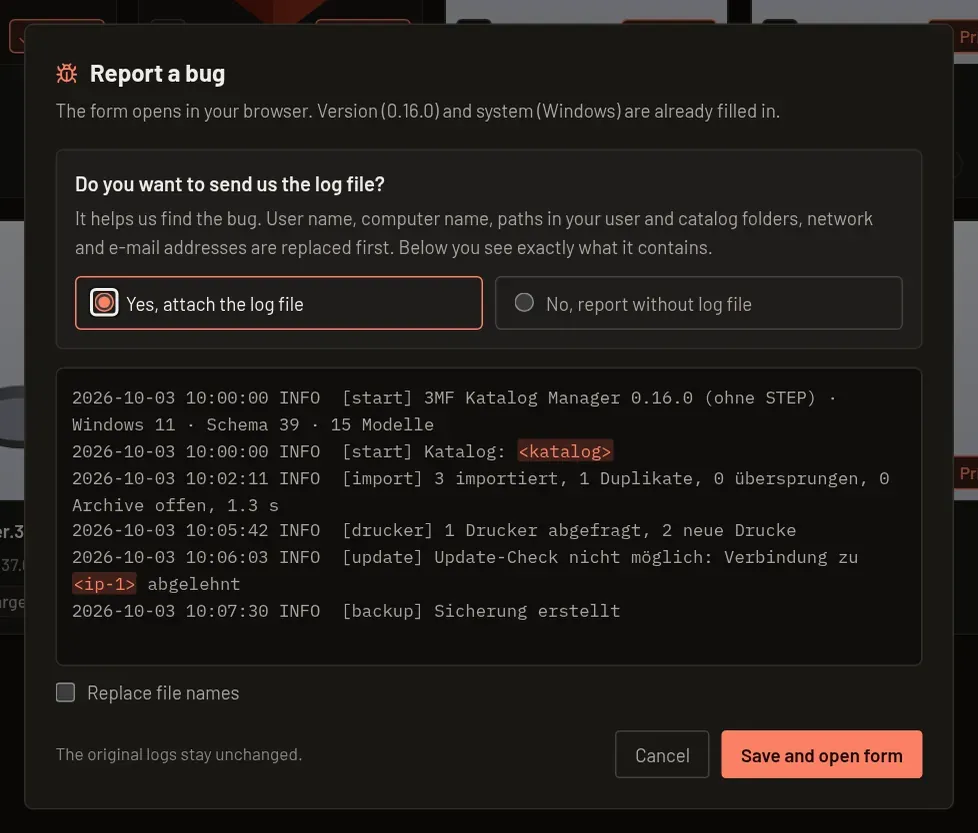
- Open Settings → Info → Report a bug, or Report problem beside an unexpected error.
- Choose Yes, attach the log file to inspect its anonymized preview. User name, computer name, paths in your user and catalog folders, network addresses and e-mail addresses are replaced. Select Replace file names to replace those too.
- Choose Save and open form. The app saves
3mf-katalog-log-<date>.txtto Downloads and opens the form with version and system filled in. - Attach the saved file under Log file in the form. Alternatively, choose No, report without log file and Open form.
Detailed log: only needed if we ask for it. It additionally records every action with file names and turns itself off after 7 days. Open log folder (under FOLDERS, see Info) shows the log files.
Log files
Section titled “Log files”Normal logging records errors, warnings and short summaries, with at most five files of 2 MB each. Original logs remain unchanged by the report dialog.
Open the bug report form. Describe your steps, expected result and actual result; check the preview and attach the saved log yourself.