Printer connection
Printer connection
Section titled “Printer connection”With a Klipper printer running Moonraker (e.g. controlled via Mainsail or Fluidd), the app can read the filament used by finished and aborted prints itself, instead of you entering it by hand. This is off by default and read-only: the app only sends queries, never a command, and only talks to addresses you enter yourself on your home network. Resin printers can’t be connected: “Connection & network” shows an explanatory note instead. Which printers have already been checked is listed under Tested printers. Other Klipper printers should work the same way; if you want to test yours, the test page helps.
- Open “Printer Manager” in the left rail and switch on “Connection” at the bottom of the printer list.
- Select your printer and enter the address under “Connection & network” (the same IP or name you’d use to open Mainsail in a browser) → “Test connection”. If it works, the app shows the version and port, plus the point in time from which prints will be deducted — older prints are left alone. If the printer reports “Login required”, it has a login set up that this version doesn’t support yet. If the printer’s clock is wrong (no time sync), a note “The printer’s clock is wrong” shows both times: the app corrects the difference automatically, but it’s better to turn on time sync (NTP) on the printer.
- After that, the app automatically asks the printer for newly finished prints at startup, every 5 minutes, and via the “↻” button next to its status. If there are any, “Material Manager” shows the hint “N new prints waiting for confirmation” with a “Review” button.
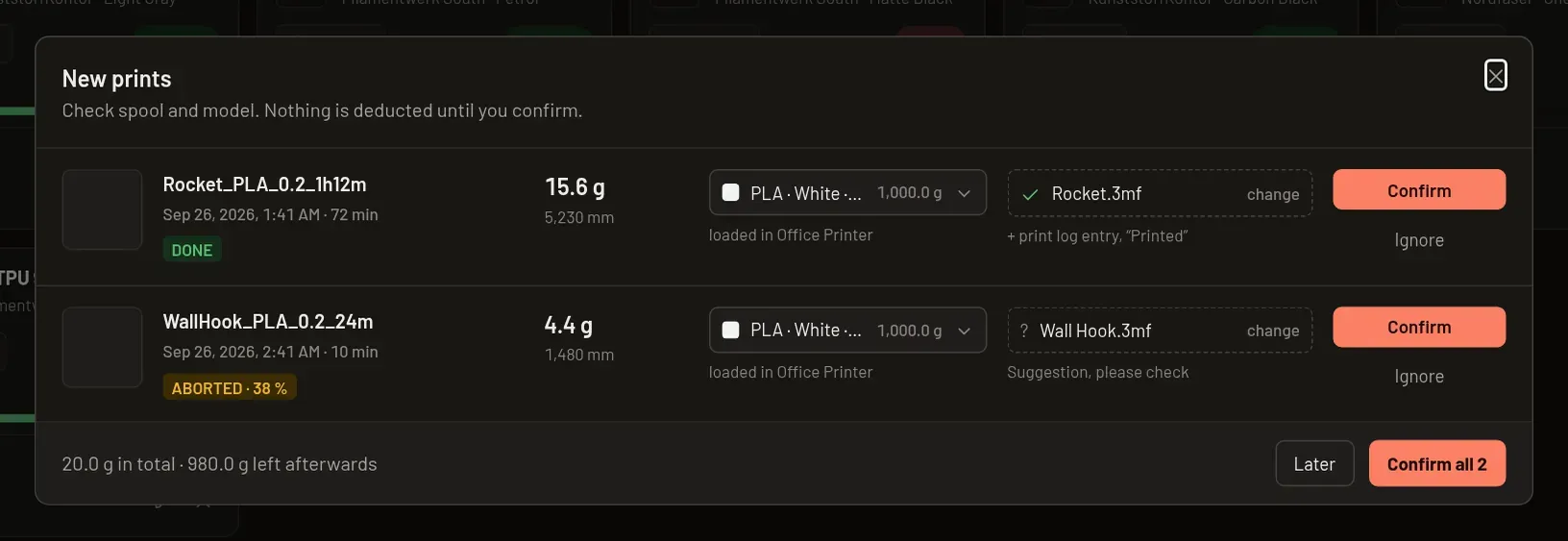
- In the “New prints” dialog that opens, you see the usage in grams per print, plus a suggested spool (the one loaded in the printer, if known) and a suggested catalog model (matched from the file name) — both can be changed. Only “Confirm” (individually or via “Confirm all N”) deducts the weight from the spool; with a model selected, this also adds a print log entry and marks the model as printed. “Ignore” discards the suggestion without booking anything.