
Install Docker
1. Choose a Compose file
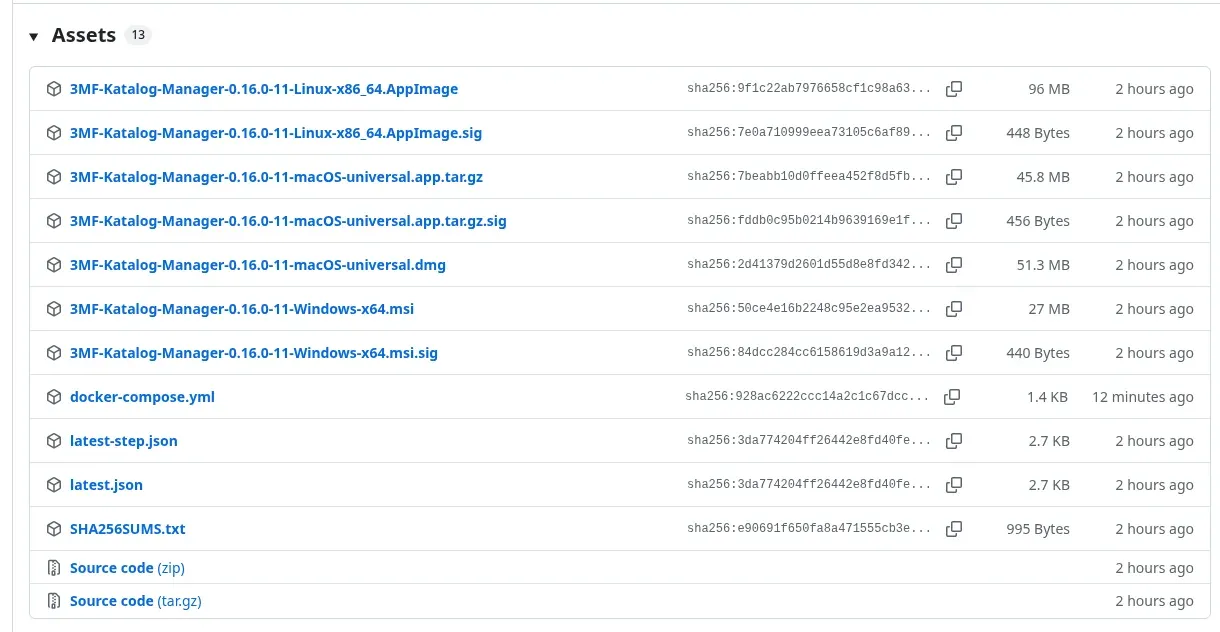
Section titled “1. Choose a Compose file”The recommended route is the ready-made docker-compose.yml in the asset list of your chosen release. You do not need to clone the repository. This file uses only image:, no build:, and defaults to that release’s version unless overridden.
- Create a dedicated folder on your server for the container.
- Save the downloaded file there as
docker-compose.yml. - Open a terminal in that folder. Run all subsequent Compose commands there.
Alternative: repository files
Section titled “Alternative: repository files”Use the complete docker/ folder from the repository and enter it. Copy .env.example to .env:
cp .env.example .envThis Compose file also contains a build: section. To use the published image explicitly run:
docker compose pulldocker compose up -d --no-buildFirst choose the tag and settings described below. For a local build, also set APP_URL to the HTTPS URL of the Linux-x86_64 AppImage and set its matching APP_VERSION. Enter only the value after =. Then run:
docker compose builddocker compose up -d --no-buildBASE_IMAGE only applies to this local build; its default is ghcr.io/linuxserver/baseimage-selkies:ubuntunoble (fixed by digest).
2. Prepare folders and permissions
Section titled “2. Prepare folders and permissions”mkdir -p config modelsid -uid -g./config is mounted at /config and must use local storage. ./models is mounted at /models. Set PUID and PGID to the IDs you obtained. Host folders must allow these IDs to read, traverse and write; also check NAS ACLs. CUSTOM_USER is only the browser login and does not change file permissions.
MODELS_DIR can select another host folder. Keep container paths unchanged: the catalog stores absolute paths. For another library, enable a mount to /models2 in Compose, for example.
3. Configure .env
Section titled “3. Configure .env”For the release file, create your own .env next to docker-compose.yml. Example with the fixed version 0.16.0:
IMAGE_TAG=0.16.0PUID=1000PGID=1000TZ=Europe/BerlinUMASK=022MODELS_DIR=./modelsCUSTOM_USER=abcPASSWORD=ALLOW_NO_AUTH=falseAdjust IDs and paths. If you omit IMAGE_TAG when using the release file, its release version remains the default. The repository example defaults to latest instead. A fixed version such as 0.16.0 (without v) stays as it is; latest follows the newest stable version.
| Variable | Meaning and default |
|---|---|
IMAGE_TAG |
Image version; repository: latest, release file: that release’s version. rc follows published pre-release (RC) images when there is one. |
PUID, PGID |
App user’s host IDs; both 1000. |
TZ |
Time zone; Europe/Berlin. |
UMASK |
File permission mask; 022. Consider 002 for a shared group. The password file stays at 600. |
MODELS_DIR |
Host source for /models; ./models. |
CUSTOM_USER |
Browser username; abc. |
PASSWORD |
Empty: generate a password or reuse the saved one. Otherwise a supplied password. |
ALLOW_NO_AUTH |
false; exactly true disables login, even with a supplied password. |
KATALOG_PUBLIC_URL |
Optional fixed browser address without a trailing slash. Otherwise learned when visiting the companion page. |
KATALOG_UPLOAD_DIR |
Optional upload destination; /models/Eingang. |
KATALOG_UPLOAD_MAX_MB |
Optional positive integer in MiB per file; 2048. Use no more than 4096 because of nginx. |
APP_URL, APP_VERSION |
Local builds only; both empty in the repository example and required for a build. |
BASE_IMAGE |
Local builds only; default shown above. |
Also enable the three optional KATALOG_ variables under environment: in Compose. An entry in .env alone is insufficient. Empty upload values use service defaults. See Usage for details.
chmod 600 .envCredential rules
Section titled “Credential rules”CUSTOM_USER allows only A-Z, a-z, 0-9, dot, underscore and hyphen, with no leading hyphen. PASSWORD must not start with a hyphen or contain spaces, tabs, line breaks or these characters: *, ?, [, :, %, \.
The container does not enforce a minimum or maximum length for supplied values. Generated passwords contain exactly 48 lowercase hexadecimal characters. Empty values use defaults. Invalid characters prevent startup even with ALLOW_NO_AUTH=true.
Keep login enabled on your home network. ALLOW_NO_AUTH=true allows access without signing in and emits a warning in the log.
4. Start and sign in
Section titled “4. Start and sign in”For the release file:
docker compose pulldocker compose up -ddocker compose psdocker compose logs 3mf-katalog- Open
http://127.0.0.1:3000on the Docker host. Port3001provides the base image’s HTTPS endpoint. - Sign in with
CUSTOM_USER(defaultabc) and your password. - With an empty
PASSWORD, the generated password appears in the log only when first created. It is also stored inconfig/.kasmvnc-password:
cat config/.kasmvnc-passwordThe file has permissions 600; read it using an authorized host account. Later starts reuse the password. A supplied PASSWORD does not replace the saved random password file; removing that variable restores the saved password. A supplied password is visible in the container environment through docker inspect. Protect .env, the password file and first-start logs.
5. Home network and reverse proxy
Section titled “5. Home network and reverse proxy”Both ports bind only to the host’s 127.0.0.1 by default. For other devices, replace that address with your server’s actual LAN IP, for example:
ports: - "192.168.1.10:3000:3000" - "192.168.1.10:3001:3001"Recreate the container with docker compose up -d and open, for example, http://192.168.1.10:3000. Use your actual address. Login remains enabled.
A reverse proxy must forward the public Host, including its port, and X-Forwarded-Proto, and support WebSockets. For Nginx Proxy Manager, the Docker README names the “Websockets” option. For external access, use TLS with a valid certificate and retain login protection. Do not publish internal ports 8082 or 8099 on the host. Uploads also need suitable size limits and streaming.
6. Check operation
Section titled “6. Check operation”docker compose psdocker inspect --format '{{.State.Health.Status}}' "$(docker compose ps -q 3mf-katalog)"docker compose logs --tail=100 3mf-katalogThe healthcheck has a 120-second start period and executes every 30 seconds. It checks a live app process and HTTP status 200 or 401 on port 3000. It does not prove full GUI usability. Also check the app and /katalog/ in your browser. Continue to usage.